
Available soon in the following languages:
Release Type: Core Feature
Applicable Roles: Farm Supervisor, Production Supervisor
Module: Production Work Order
Objective: Execute packaging, preparation, and dispatch activities exactly as allocated by Warehouse Allocation.
Feature Overview
What is the Production Work Order page?
The Production Work Order page is the final execution layer of the Demand–Supply Allocation process.
It translates:
- Sales demand
- Adjusted capacity
- Warehouse allocation decisions
into clear, actionable instructions for farm and production teams.
This page is the single source of truth for:
- What to pack
- How much to pack
- For which channel
- For which beat
- From which farm / warehouse
- For which dispatch
What this page replaces
Earlier:
- Verbal coordination
- WhatsApp messages
- Manual sheets
- Partial visibility
Now:
- System-generated work orders
- Zero ambiguity
- Traceable execution
Who Uses This Page?
| Role | Access |
|---|---|
| Farm Supervisor | Full Access |
| Production Supervisor | Full Access |
| Warehouse / Supply Manager | Full Access |
This page is read-only from a planning perspective.
When Does a Production Work Order Get Created?
A Production Work Order is created only after:
- Supply Capping is declared
- Sales demand is generated
- Demand is adjusted
- Carry Forward is finalized
- Warehouse Allocation is completed
If any of the above steps are pending, no work order will appear.
Key Concepts You Must Understand
Packaging vs Dispatch (Critical)
- Packaging Assignment
- What quantity you must pack
- Which SKUs
- For which beat
- For which channel
- Dispatch Warehouse
- Where the packed stock will move
- May or may not be your farm
You may be packing for a beat that is dispatched from another warehouse.
Date Logic
- Work Orders are shown date-wise
- Date refers to:
- The fulfillment / dispatch date
- Always verify the date before execution
Step-by-Step: How to Use Production Work Order Page
Step 1: Login & Navigate
- Open https://
oms.eggoz.in - Login using Mobile No & OTP
- Navigate to Production Work Order page
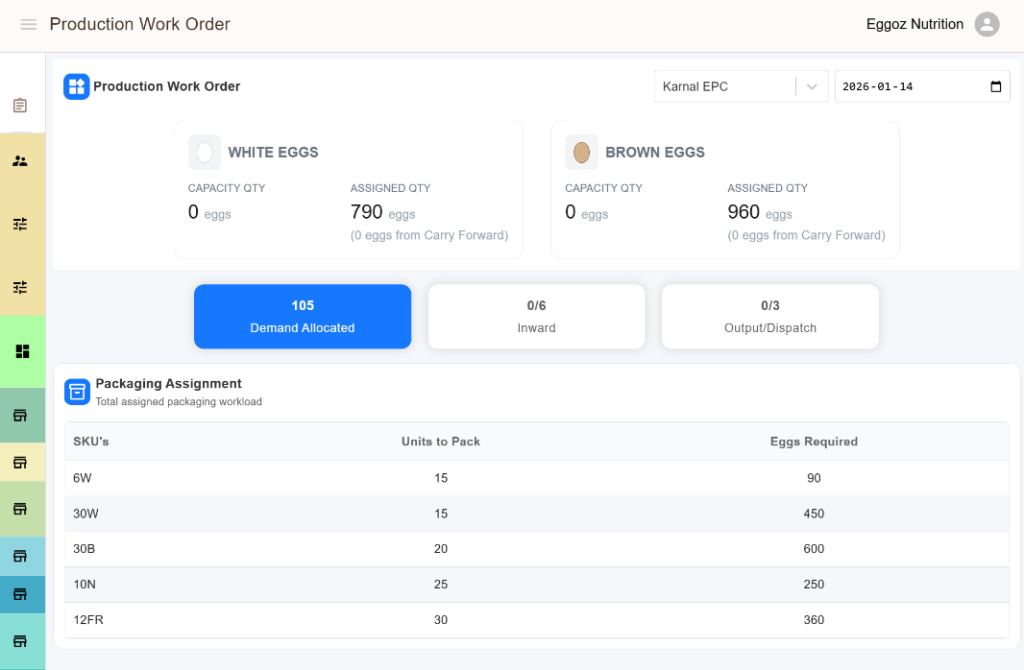
Step 2: Use Tabs INWARD / OUTPUT
Use tabs to narrow down:
- Inward / Procurement
- Output / Dispatch
System Rules & Validations
- Production Work Orders are read-only in terms of planning
- Work orders are date-bound
- Farm-level View
Support & Escalation
Contact Tech-Support for:
- Missing work orders
- Quantity mismatch
- Incorrect warehouse assignment
- Date or visibility issues